
10 Easy Minecraft Pixel Art Patterns (Free Templates)
Build ten 8x8 Minecraft pixel art patterns with numbered grids, checked material counts, and editable templates. Pick a heart, sword, flower, or cloud.
Pick a pattern and build from its grid
These ten templates each occupy an 8×8 grid. Every colored square represents one block; pale gray squares are empty space and are excluded from the shopping list. The previews and material counts match the editable templates linked below.
Open a template in Draw Mode to change its colors, check individual blocks, or export it. You can also build directly from the numbered grid without using the editor. These are flat front-view murals, not finished in-game screenshots.
Quick Start Guide
- Click any pattern's "Open in Draw Mode" link
- Confirm the loaded canvas is 8×8 and compare its shopping list with the counts below
- Gather the materials; leave pale gray cells empty
- For an upright mural, build row 1 at the bottom, then work upward to row 8. Columns run left to right as you face the artwork
Choose by material cost: the sword uses 8 blocks, the lightning bolt 18, and the heart 40. For a large version, double both dimensions to 16×16 and multiply every material count by four. Any frame or temporary support blocks are extra.
The 10 Patterns
1. Red Heart ❤️
Difficulty: Easy | Size: 8×8 blocks | Blocks: Red Wool
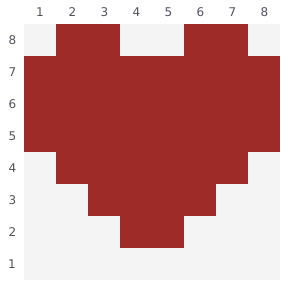
A red heart for a wall, health-bar display, or small sign. Keep the empty notch at the top and the two-block tip on row 2; row 1 stays empty.
Blocks needed:
- Red Wool: 40 blocks
2. Diamond Sword ⚔️
Difficulty: Easy | Size: 8×8 blocks | Blocks: Cyan Concrete, Gray Wool, Brown Wool
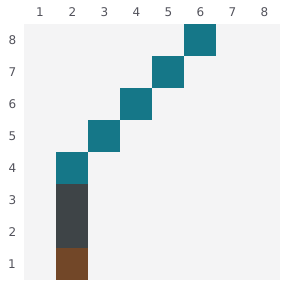
The iconic Minecraft weapon. Build it as wall decoration or as part of a larger weapons display.
Blocks needed:
- Cyan Concrete: 5 blocks
- Gray Wool: 2 blocks
- Brown Wool: 1 block
3. Gold Star ⭐
Difficulty: Easy | Size: 8×8 blocks | Blocks: Yellow Wool
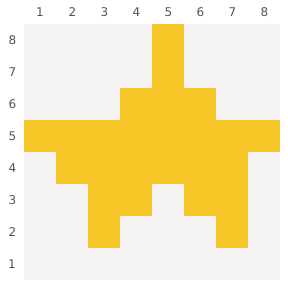
Perfect for rating systems, achievements, or magical-themed builds. The star shape works great on signs or as floor decoration.
Blocks needed:
- Yellow Wool: 25 blocks
4. Smiley Face 😊
Difficulty: Easy | Size: 8×8 blocks | Blocks: Yellow Wool, Black Wool
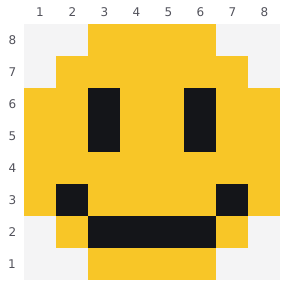
A yellow smiley for a welcome sign. Keep the two black eyes separated and follow the mouth one row at a time.
Blocks needed:
- Yellow Wool: 42 blocks
- Black Wool: 10 blocks
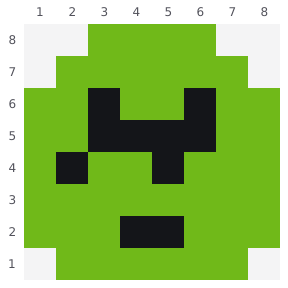
5. Creeper Face 🟩
Difficulty: Medium | Size: 8×8 blocks | Blocks: Lime Wool, Black Wool
Every Minecraft player's favorite mob. Perfect for warning signs, TNT storage rooms, or just showing your love for creepers.
Blocks needed:
- Lime Wool: 46 blocks
- Black Wool: 10 blocks
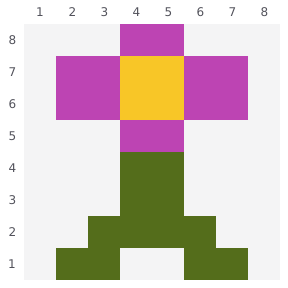
6. Pink Flower 🌸
Difficulty: Easy | Size: 8×8 blocks | Blocks: Magenta Wool, Yellow Wool, Green Wool
A simple flower design that looks great in gardens, as window boxes, or scattered across meadows.
Blocks needed:
- Magenta Wool: 12 blocks
- Yellow Wool: 4 blocks
- Green Wool: 12 blocks
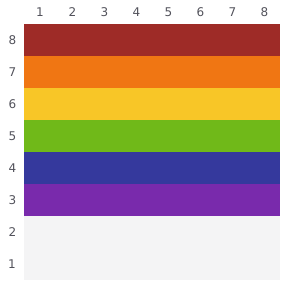
7. Rainbow 🌈
Difficulty: Easy | Size: 8×8 blocks | Blocks: Red, Orange, Yellow, Lime, Blue, Purple Wool
A colorful horizontal rainbow. Great for pride builds, children's rooms, or adding color to any space.
Blocks needed:
- Red Wool: 8 blocks
- Orange Wool: 8 blocks
- Yellow Wool: 8 blocks
- Lime Wool: 8 blocks
- Blue Wool: 8 blocks
- Purple Wool: 8 blocks
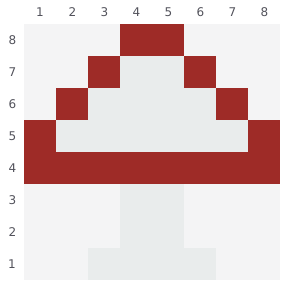
8. Red Mushroom 🍄
Difficulty: Medium | Size: 8×8 blocks | Blocks: Red Wool, White Wool
The classic Mario-style mushroom. Perfect for mushroom houses, fantasy forests, or retro gaming themes.
Blocks needed:
- Red Wool: 16 blocks
- White Wool: 20 blocks
9. Cloud ☁️
Difficulty: Easy | Size: 8×8 blocks | Blocks: White Wool, Light Blue Wool
A fluffy cloud with a hint of blue sky. Great for sky builds, weather stations, or dreamy fantasy themes.
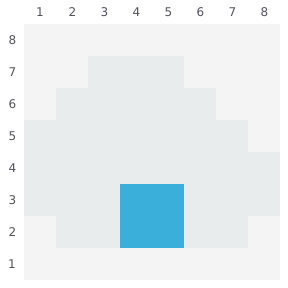
Blocks needed:
- White Wool: 33 blocks
- Light Blue Wool: 4 blocks
10. Lightning Bolt ⚡
Difficulty: Easy | Size: 8×8 blocks | Blocks: Yellow Wool
A striking lightning bolt. Perfect for speed challenges, power stations, or Thor-themed builds.
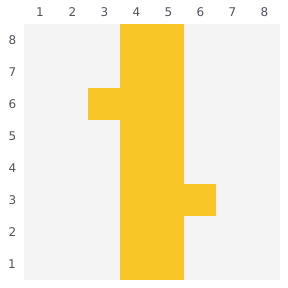
Blocks needed:
- Yellow Wool: 18 blocks
Tips for Building These Patterns
Choose Your Block Type
- Wool (used in these patterns): Easy to farm, soft colors
- Concrete: More vibrant colors, requires crafting
- Terracotta: Earthy tones, great for vintage looks
Building Order
- Start from the bottom layer
- Work row by row
- Use the layer view in our editor to focus on one level at a time
- Use the shopping list to check off materials you have gathered; it does not track each placed block
Size Scaling
To enlarge a pattern while preserving its shape, repeat each original square in both directions. Changing the canvas size alone does not promise this result:
- 16×16: Each pixel becomes 2×2 blocks
- 32×32: Each pixel becomes 4×4 blocks
For example, the red heart needs 40 Red Wool at 8×8, 160 (2 stacks + 32) at 16×16, or 640 (10 stacks) at 32×32. Empty cells stay empty. If you swap one material for another, carry its count over unchanged.
Java and Bedrock use
The grids and manual material lists can guide builds in either edition. This editor's .nbt and command exports are for Java workflows; they are not Bedrock .mcstructure files. On Bedrock or console, keep the grid open on a second screen and place blocks manually.
Create Your Own Patterns
Ready to design something original?
Open Blank Draw Mode → - Start with an empty 32×32 canvas and create your own pixel art from scratch.
Try Blueprint Mode → - Upload an image and convert it to a buildable pattern automatically.
Pattern Ideas for Your Next Build
- Combine patterns: Put the heart and star side by side, leaving a column of space between them
- Color swaps: Try the heart in pink, or the star in rainbow colors
- Pattern borders: Frame these small patterns with a decorative border
- Giant versions: Scale up 4x for massive wall art
Template checks and corrections
On September 23, 2026, we checked all ten linked templates against their 8×8 grids and excluded empty cells from every material total. We corrected the heart, star, smiley, creeper, mushroom, and cloud lists and added previews of the actual templates. These checks cover the editor data; they are not a claim that every pattern has been built in every Minecraft edition.
If a template opens differently or a count no longer matches, send the pattern name and the mismatch. See how we check guides and handle corrections.