
Minecraft Letter Generator
Turn text into buildable block letters. Choose materials, then save the grid and material CSV.
A–Z, 0–9, spaces and line breaks.
Preview, materials and exports use the generated plan.
2. Preview your letters
Includes a one-block margin on every side.
Materials · 110 blocks
- White Concrete · 1101 full stacks + 46
Build row by row
From bottom · read left to right. All rows visible.
Build signs for your world
Use block letters for a home entrance, shop label or welcome wall.
White Concrete letters · no background blocks
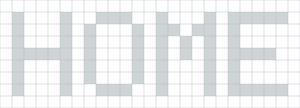
69 letter blocks
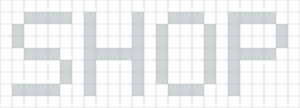
63 letter blocks
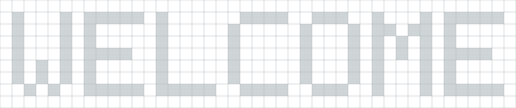
110 letter blocks
One-block spacing and a one-block outer margin. Gray cells are empty and do not count toward materials. These plans come from this tool, not in-game screenshots.
How to use
- 1. Type your messageAdd letters, numbers or line breaks. Lines align left with one base row between them.
- 2. Choose blocks and generateSet height, spacing and materials, then generate. Exports always use the displayed plan.
- 3. Build or exportBuild left to right from the bottom row. Choose More exports for PNG, material CSV, Java .mcfunction or Java structure .nbt.
Need an image wall? Open the mural generator. For freehand changes, see the Draw workflow.
A–Z and 0–9 block-letter reference
Each original glyph fits a 5-column by 7-row cell. The same masks power the generator and this reference.
Letter generator FAQ
Which characters can I use?
Use A–Z, 0–9, spaces and line breaks. Lowercase a–z becomes uppercase. Other characters produce an error so you can correct the text without losing the last plan.
Is this the official Minecraft font?
No. These original 5×7 block-letter designs were made for this tool. They are whole-block patterns, not a font download, logo generator or chat-formatting tool.
How large can the letters be?
Choose 7, 14, 21 or 28 blocks tall. Larger letters scale each filled cell into a square of blocks. Letter gaps are 0–3 blocks; a space is three base columns. The complete plan must fit within 256 blocks wide and 128 blocks tall.
Do empty cells count in the materials?
With Background set to None, empty cells are air and do not count. Every plan includes a one-block outer margin. Selecting a background block fills all non-letter cells, including this margin. Full stacks use 64 blocks, with the remainder listed separately.
Can I use the plan in Java or Bedrock?
The grid, PNG and material CSV are manual building references for either edition. More exports also offers Java .mcfunction commands and Java structure .nbt for compatible tools. These are not Bedrock .mcstructure, .litematic or .schem files. The site does not install files or place blocks in your world.
What if my message is too wide?
Shorten the message, add line breaks, reduce spacing or choose a smaller height. The error shows the proposed size. Your previous preview and downloads remain available until a new plan succeeds.
Decorative background artwork is illustrative. For a mismatched glyph or material count, contact the project. Read How We Test for verification limits.